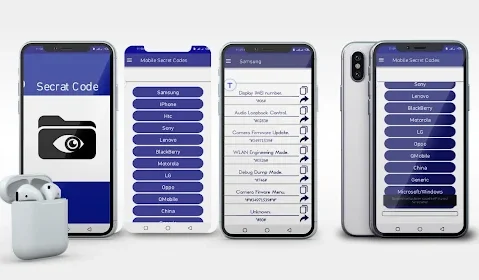

Secret codes have always been part of Android, but most people never explore them or even realize how useful they can be. The All-in-One Secret Codes App brings these hidden tools together in one place and turns something complicated into something simple and practical. With phones becoming more advanced every year, having a smart way to access diagnostic tools, hardware tests, and system information has become more important. This app fills that gap for anyone who wants to know what’s happening inside their device without digging through settings.
What Is the All-in-One Secret Codes App?
The All-in-One Secret Codes App is a utility tool designed to collect and organize special dialing codes used in Android devices. These codes allow users to test hardware functions, check system information, and access deep device menus that are normally hidden from regular users. Instead of searching code by code across the internet, this app makes everything accessible from one clean dashboard.
In short, it’s a handbook for phone diagnostics, security checks, and hardware testing built into a single app.
Who usually uses it:
• People who troubleshoot phone issues
• Users who want to check their hardware performance
• Technicians who repair or test smartphones
• Everyday users curious about device information
What makes it stand out:
• A complete library of codes for multiple brands
• Organized sections so users don’t get lost
• Easy access to phone tests without technical skills
• Works on almost all Android models
Key Features
• A full list of secret codes categorized by brand and function
• Hardware testing shortcuts for battery, speaker, microphone, sensors, vibration, and more
• Device information tools that show IMEI, software version, and internal statistics
• Network and connectivity codes for checking SIM, signal strength, and network status
• Security and reset tools (only accessible if supported by the device)
• A simple interface that works even for users with little technical knowledge
• Search bar for quickly finding specific codes
• Quick access to most-used codes
• Regular code updates based on new Android versions
• Secure system that doesn’t modify device files
Benefits of Using the All-in-One Secret Codes App
The biggest advantage of this app is convenience. Instead of exploring settings or looking for hidden menus manually, everything is available from one neat dashboard. Users don’t need technical training or repair knowledge to run hardware checks or view system details. It saves time, reduces guesswork, and helps spot issues before they become major problems.
It also helps users understand their smartphone better. Many people replace a device thinking it’s faulty when the real problem is a minor sensor glitch or a cache issue. Using built-in tests helps confirm what’s wrong before spending money on repairs.
Why it’s helpful in daily life:
• Lets users test phone functions without visiting a shop
• Helps diagnose performance problems
• Useful when buying or selling a used phone
• Saves time by giving instant access to hidden menus
• Ideal for monitoring battery and hardware health over time
Quick summary of key benefits:
• Convenient access to hidden tools
• Saves time during diagnostics
• Helps maintain device performance
• Reduces repair guesswork
• Useful for both new and old phones
• Supports multiple Android brands
Recent Trends
As Android continues to evolve, the demand for simple diagnostic tools grows. In 2025, people expect apps to be more intuitive and helpful without requiring deep technical knowledge. The All-in-One Secret Codes App follows this trend by expanding its code library and improving compatibility with newer devices. It adapts to the increasing variety of smartphone brands and updates its database as new models arrive.
Recent improvements and trends:
• Better support for 5G-enabled devices
• Faster and cleaner user interface
• Expanded code list for newer brands
• More tools for sensor calibration
• Growing interest in self-diagnosis apps
• Increased demand for privacy-focused utilities
Pros of the All-in-One Secret Codes App
| Pros | Description |
|---|---|
| Easy to Use | The interface is straightforward, making it simple for anyone to test their phone. |
| Time Saving | Provides direct shortcuts to hidden menus without searching manually. |
| Reliable Performance | Works smoothly on most Android phones with consistent results. |
| Offline Support | Many tests and information tools work even without internet. |
| Regular Updates | New codes and features are added over time. |
| Wide Compatibility | Supports a large number of Android brands and models. |
| Helpful for Diagnostics | Makes it easy to check sensors, hardware, and system info. |
| Organized Code Library | Codes are grouped for quick navigation. |
| Useful for Used Phones | Helps verify hardware before buying or selling a device. |
| Lightweight Tool | Doesn’t slow down the device or consume heavy resources. |
Cons of the All-in-One Secret Codes App
| Cons | Description |
|---|---|
| Limited Free Features | Some users may find certain sections limited on specific devices. |
| Ads in Free Version | Occasional ads may appear depending on the version. |
| Requires Permissions | Needs basic permissions to run certain tests. |
| Occasional Bugs | New Android versions may cause temporary glitches. |
| Device Restrictions | Some codes may not work on every model. |
| Brand-Specific Codes | Not all brands support the same diagnostic tools. |
| Learning Curve | New users may need time to understand code functions. |
| Risk of Misuse | Users should avoid executing codes they don’t understand. |
| Network Variations | Network codes may differ by country. |
| Model Differences | Older devices may not support all hardware tests. |
Alternatives to the All-in-One Secret Codes App
| Alternative | Description |
|---|---|
| Device Info App | Focuses on detailed hardware and system information. |
| Phone Check App | Offers complete phone diagnostics with step-by-step tests. |
| Hardware Testing Tool | Specialized for sensor and component testing. |
| Network Info Utility | Provides deep insights into SIM and network status. |
| System Utility Kit | Includes performance tools and optimization options. |
| Advanced Mobile Tools | Useful for technicians needing multiple utilities. |
| Sensor Lab App | Dedicated to calibrating and testing phone sensors. |
| IMEI Utility Checker | Helps verify phone authenticity and status. |
| Phone Doctor App | Known for its wide range of hardware checks. |
| Mobile Tester Suite | Provides organized test tools for various phone models. |
Why Use It
The All-in-One Secret Codes App fills a real need for users who want quick access to internal tools without memorizing long codes. It helps keep phones running smoothly and makes it easy to understand what’s happening behind the scenes. Whether someone is troubleshooting, checking a used phone, or simply curious about performance, this app offers a practical, all-in-one solution.
Mistakes to Avoid
Many people use secret codes without understanding their purpose, which can lead to confusion or unwanted changes. Using the app correctly ensures a safe and smooth experience.
Common mistakes:
• Running factory reset codes without backing up data
• Using network codes without knowing their effect
• Confusing brand-specific codes with general ones
• Assuming all codes work the same on every device
• Ignoring warnings before running sensitive tests
• Running multiple tests at once
• Using advanced codes while the phone battery is low
• Misinterpreting hardware results without further checking
• Sharing sensitive codes with untrusted users
• Forgetting that some features depend on the model and region
How to avoid these mistakes:
• Always read descriptions before using a code
• Start with basic tests
• Avoid using reset or advanced codes unless necessary
• Keep your phone charged during diagnostics
• Use the app for information first before making changes
Final Thoughts
The All-in-One Secret Codes App brings together tools that most Android users never explore but can genuinely benefit from. It makes testing, diagnosing, and understanding your phone easier, even for beginners. Instead of digging through menus or hunting online for codes that may not work, everything becomes accessible in one place. It’s a helpful companion for anyone who wants better control over their device and a clearer view of its performance.
If you value a phone that runs smoothly, stays healthy, and gives you reliable performance, this app is a practical choice. Explore it with patience, use the codes responsibly, and enjoy the confidence that comes from understanding your device better.