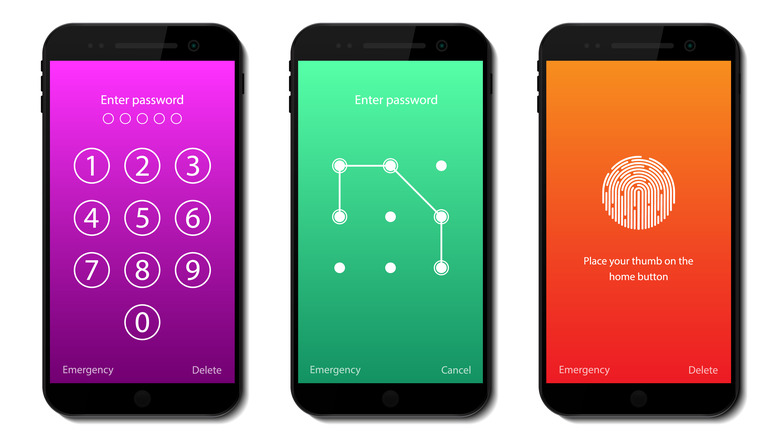

We’ve all been there: staring at the lock screen, trying every birthday, anniversary, and pet name combination, only to see “Wrong pattern” or “Incorrect PIN” flash one too many times. In 2025, with phones holding our entire lives — banking apps, private photos, work emails — being locked out feels like a mini crisis. The good news? There are several safe, official ways to get back in without losing everything (or resorting to sketchy websites). Let’s walk through the smartest, safest methods step by step.
What Happens When You Forget Your Phone Password
Forgetting your lock screen password, PIN, pattern, or biometric backup isn’t just inconvenient — it triggers real security features designed by Google (Android) and Apple (iPhone) to protect your data. Here’s what actually goes on behind the scenes:
- After roughly 10 wrong attempts, most phones temporarily disable new tries (from 30 seconds to several minutes).
- On many Android devices, you’ll eventually see a “Forgot pattern/PIN/password” option.
- If you’ve ever signed into a Google or Apple account on that phone, the companies built official recovery paths.
- Without prior setup (like Find My iPhone or Google’s Find My Device), recovery gets much harder — sometimes requiring a full factory reset.
Understanding these built-in safeguards helps you pick the right recovery path instead of panicking.
Key Features of Official Phone-Unlock Recovery Methods
The best recovery tools aren’t third-party apps — they’re the ones baked into Android and iOS by design:
- Google’s Find My Device (Android)
- Apple’s Find My + iCloud recovery (iPhone)
- Samsung’s Find My Mobile (for Galaxy users)
- Smart Lock settings that can temporarily bypass the lock screen under certain trusted conditions
- Built-in “Forgot pattern” flow tied to your Google account
- Emergency backup PINs (if you set one up when creating the original password)
These methods stand out because they’re created by the same companies that made your phone — meaning no malware risk, no voided warranties, and maximum data protection.
Benefits of Using Official Recovery Methods
Choosing Google, Apple, or Samsung’s own tools over random websites or paid “unlock services” has huge real-world advantages:
- Your data stays encrypted and safe — no third party ever sees it.
- Zero risk of installing malware or spyware.
- Completely free (except in very rare cases where Apple charges for an account-recovery escrow delay).
- Preserves your warranty and doesn’t flag your device as tampered.
- Often lets you regain access without erasing everything (if you act quickly).
Key benefits at a glance:
- 100% safe and legal
- No extra software downloads
- Keeps photos, messages, and apps intact when possible
- Works remotely from any browser
- Regularly updated by the manufacturer
Recent Trends in Phone Recovery (2025)
Phone security and recovery keep evolving fast. Here’s what’s new this year:
- Google now requires two-step verification for almost all Find My Device remote unlocks on Android 15+.
- Apple introduced “Stolen Device Protection” in iOS 18, adding an extra security delay before you can erase or change passwords — even with your Apple ID.
- Passkeys and biometric-only logins are rising, meaning fewer people even set traditional PINs (until biometrics fail).
- Manufacturers are pushing “Recovery Key” or “Backup Codes” during setup more aggressively.
- Samsung expanded its SmartThings Find network to help locate completely powered-off Galaxy phones.
The trend is clear: security is getting tighter, but so are official recovery pathways — if you prepared ahead.
Pros of Official Recovery Methods
| Pros | Description |
|---|---|
| Completely Safe | Created by Google/Apple/Samsung — no malware or phishing risk |
| Free of Charge | Never pay a cent for legitimate recovery |
| Remote Access | Unlock or erase from any computer or borrowed phone |
| Data Preservation Possible | Many methods let you regain access without wiping the phone |
| Instant or Near-Instant | Usually takes minutes if you have credentials ready |
| No Warranty Issues | Fully supported by the manufacturer |
Cons of Official Recovery Methods
| Cons | Description |
|---|---|
| Requires Prior Setup | You must have enabled Find My Device/iCloud beforehand |
| Factory Reset as Last Resort | If nothing else works, you lose all data not backed up |
| Two-Step Verification Delays | Extra security codes can slow the process down |
| Internet Required | Both the phone and your recovery device need connectivity |
| Account Recovery Takes Time | If you also forgot your Google/Apple password, it can take days |
| Newer Security Features Add Steps | Stolen Device Protection, Security Delay, etc., intentionally slow things |
Alternatives to Official Methods
Sometimes official channels aren’t an option (old phone, no prior setup, etc.). Here are the realistic alternatives — ranked from safest to riskiest:
| Alternative | Description |
|---|---|
| OEM Unlock + Custom Recovery (Advanced Android) | Uses fastboot and official tools — very technical, wipes data |
| Carrier Assistance | Some carriers can help with SIM-locked or financed phones |
| Manufacturer Service Center | Apple Store or Samsung Experience Store can unlock for a fee (with proof of ownership) |
| Trusted Friend/Family Google Family Link or Apple Sharing | If someone else was added as a trusted contact or family member |
| Professional Data Recovery Shops | Last resort for physically damaged or completely bricked devices |
Avoid any website or YouTube video promising “free unlock in 5 minutes” — 99% are scams or malware.
Why You Should Always Use Official Methods First
Speed and safety. In 2025, the gap between legitimate recovery and shady services has never been wider. One wrong download can install ransomware that locks you out for real and demands Bitcoin. Official tools cost nothing, risk nothing, and usually work within minutes if you ever added your Google or Apple account — which almost everyone has.
Mistakes to Avoid When You’re Locked Out
Panicking leads to bad decisions. Here’s what not to do:
- Don’t keep guessing — after too many attempts, some phones permanently lock or auto-wipe.
- Never download “unlock APK” files from random forums.
- Don’t pay money to websites that promise instant removal without proof of ownership.
- Don’t factory reset immediately — you’ll lose everything not backed up.
- Don’t ignore the “Forgot pattern” prompt — that’s often your fastest way back in.
- Don’t borrow sketchy public computers to log into your Google/Apple account.
Stay calm, grab another device, and follow the official steps below.
Final Thoughts
Getting locked out of your phone is frustrating, but it’s almost never the end of the world in 2025. Between Google’s Find My Device, Apple’s iCloud recovery, and Samsung’s dedicated service, the legitimate paths back in are faster and safer than ever — as long as you set them up ahead of time.
Take five minutes today to double-check that Find My iPhone or Find My Device is on, write down a recovery key if offered, and maybe even set a password hint only you would know. A tiny bit of preparation now saves massive headaches later.
You’ve got this. Breathe, follow the official steps, and you’ll be back scrolling through your photos in no time.